
Choose Features by What You Want to Do
PositiveSingles features are most useful when you connect each one to a dating purpose. Discovery can help you notice someone; a profile can give you a reason to write; communication can reveal whether the interest is mutual. Community features may offer another way to understand a person's perspective or feel more at home in the setting.
The public Google Play description lists search, Flame, blogs, a chat room, a private album, a pattern lock, and Drift Bottles. The official promotional screenshots also show communication and community experiences. These are product descriptions rather than a guarantee that every feature is available on every platform or membership level at the same time.
Use the guide below to decide which tools are relevant to your style. You do not have to use everything. A small number of features used with attention can support a better experience than repeatedly opening every area without knowing what you hope to find.
Search for People You Could Actually Get to Know
Search is the deliberate route into discovery. It lets you begin with criteria instead of relying only on whoever happens to catch your eye. Start with the circumstances that shape a possible relationship, such as location and the preferences available in your account. Then read the profile to understand the person behind the result.
A useful search is not necessarily the narrowest one. If you apply every available preference, you may exclude people over details that would not matter in real life. On the other hand, a search so broad that none of the results could become a practical meeting may create activity without progress.
The matching preferences guide offers a way to review that balance. Define which preferences are essential, which are flexible, and which you are merely accustomed to choosing. Adjust one flexible element at a time so you can understand the difference it makes.
Use Flame as an Introduction to a Profile
Flame is presented in the app's public materials as a matching feature. Treat a quick discovery interaction as the beginning of curiosity, not as a complete assessment of compatibility. A photograph can attract your attention, but the profile and conversation provide the context you need for a better decision.
If you tend to move quickly through discovery screens, slow down when someone interests you. Read what they have chosen to share and look for a specific opening. That can help you avoid a series of matches that never become conversations because neither person has noticed anything beyond appearance.
An expression of mutual interest is encouraging, but it is not a commitment. People can reconsider, become busy, or want different things. The useful next action is a respectful introduction that gives the other person an easy way to respond, rather than an assumption that matching establishes closeness.
Let Written Contributions Reveal Perspective
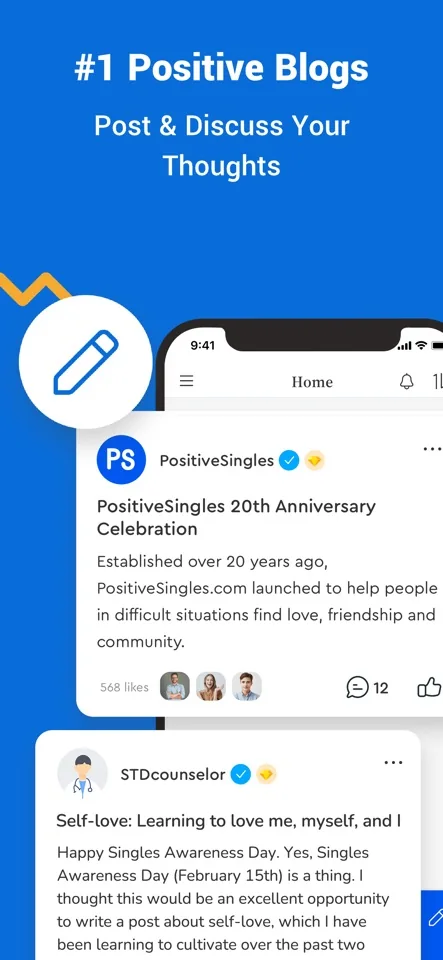
Blogs and community contributions can show how a person thinks, what they notice, and how they communicate. For some members, that is a more natural source of interest than a brief profile. A thoughtful comment can create a conversation around an actual idea rather than a generic greeting.
Read the context before replying. A post about a difficult experience may call for empathy rather than flirtation. A lighthearted discussion may welcome a different tone. Participation works better when it respects why someone contributed instead of treating every public interaction as an opportunity to obtain private attention.
Community writing is also personal expression, not clinical evidence. Members may describe experiences that differ from yours or make claims that need professional verification. Use the community to exchange perspective while keeping medical decisions with qualified sources. The audience overview explains why the same platform can include very different health circumstances.
Keep Private Album Sharing Intentional
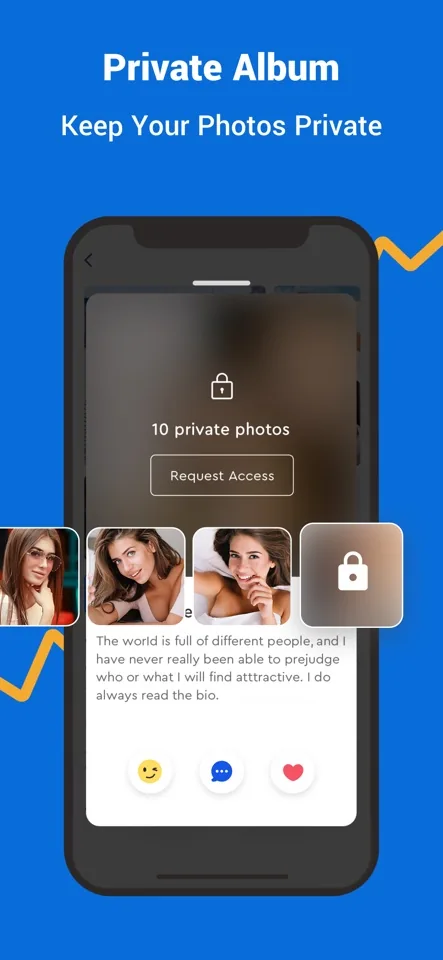
The private album is described as allowing you to authorize viewing. Its practical value is giving you a separate decision about some photographs rather than making every image part of the public introduction. You can decide which pictures belong in that space and when sharing them feels appropriate.
Permission to view a photograph does not establish trust in every other respect. Before sharing, consider whether the exchange has been respectful and whether you would be comfortable with the image being remembered or copied. No viewing control can guarantee another person's behavior outside the app.
Private does not have to mean intimate. A photograph may be private simply because it contains a familiar setting or feels more personal than your main portrait. The photo workshop helps you choose a sequence that communicates personality while limiting unnecessary exposure.
Try Drift Bottles for a Different Opening
The app description presents Drift Bottles as a way to throw and pick up messages that share something about yourself. This can suit someone who enjoys a less conventional introduction, especially when the message contains an idea or question that another person can respond to naturally.
Make the content worth receiving. A small observation, a playful choice between two everyday options, or a genuine question can be more inviting than an empty greeting. Avoid putting sensitive personal information into a message just because it feels less direct than a profile exchange.
If a response interests you, return to ordinary relationship judgment. Learn who the person is, see whether the conversation is reciprocal, and respect their boundaries. An unusual introduction can be memorable, but it does not replace the gradual process of building trust.
Separate App Controls from Phone Controls
The published Android feature list includes a pattern lock, but you should inspect the installed app before relying on a specific control. An app-level lock and your phone's screen lock are different protections. Notification previews, photo permissions, and shared-device access may require separate choices in operating system settings.
Think about the situation you want to address. If the concern is a message appearing on a table, review notification previews. If it is someone borrowing an unlocked phone, review device access and your sharing habits. If it is what another member sees, inspect profile and album settings.
The privacy article organizes these choices around real situations. Avoid the assumption that turning on one feature makes every part of dating invisible. A few well-understood controls are more useful than a reassuring label you have never tested.
Build a Small Feature Routine
Start with one discovery route and one communication goal. You might search for a few relevant profiles, read them carefully, and begin one exchange. On another visit, you might explore a community discussion or review your own introduction. This gives each session a purpose without making the app feel like a checklist.
After a week, notice which tools led to meaningful interaction and which simply consumed attention. Keep the useful ones close to your routine. You can return to another feature later if your interests change; there is no prize for using everything immediately.
Download the app on your preferred platform and explore the current options at your own pace. The most valuable feature is the one that helps you understand a real person more clearly and decide whether you want to continue the conversation.
Feature reference: PositiveSingles Google Play description. Visuals are official App Store promotional screenshots; layouts, availability, and membership access may vary.